David's Astronomy Pages
Notes - Session 1428 (2026-04-30)

Notes
(S1427)

Notes
Main
Home
Page

Notes
(S1429)
David's Astronomy Pages
|
Notes (S1427) |
Notes Main |
Home Page |
Notes (S1429) |
 |
Session Aims & Highlights |
| - Observing Result - Night Summary Plot - Session Event Log |
|
|
|
Operational Issues |
| - Critical Issues (0),
Major Issues (3),
Minor Issues (6),
Small Defects (1), Continuous Improvement
(5) |
|
| - Figures (0) | |
|
Images from 2026-04-30 >> |
| 2026-05-05 | |
|---|---|
|
Observatory Computer - Reinstallation of Windows 11 |
Main aims
Equipment & Software
Highlights
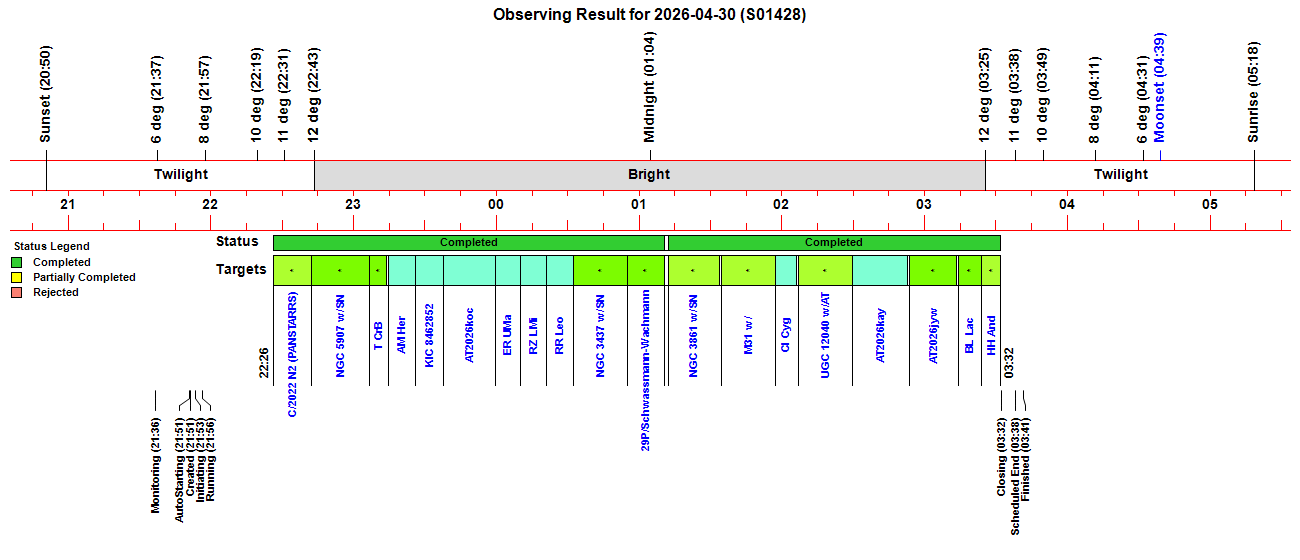
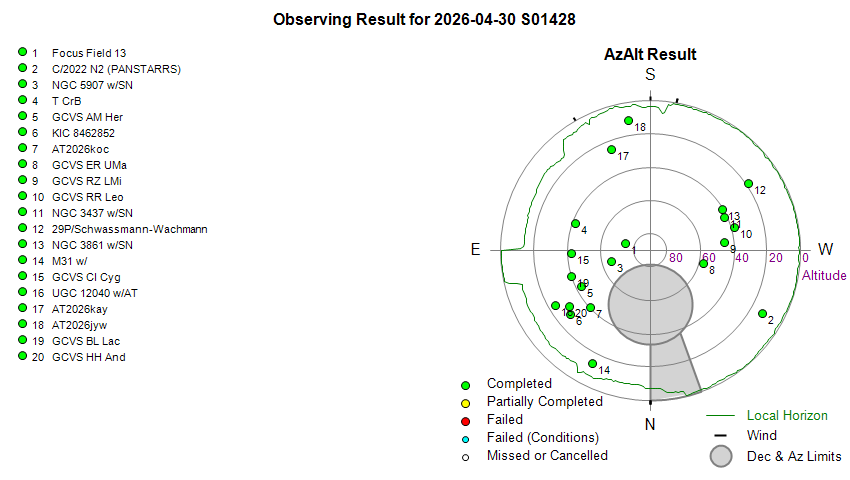
 Targets. 19/19 planned targets were completed. .
 Dome.
No issues open/closing shutter. Dome was successfully parked at the end of
the session.
Dome.
No issues open/closing shutter. Dome was successfully parked at the end of
the session.Summary Plots & Logs
Observing Plan 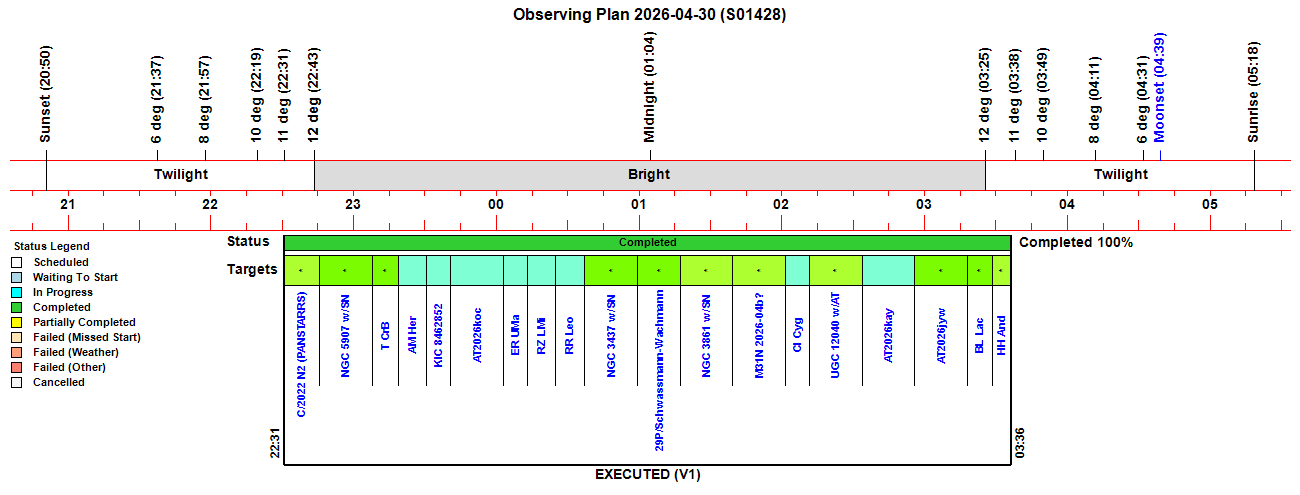 |
||||||||||||||||||||||||||||||||||||||||||||||||||||||||||||||||||||||||||||||||||||||||||||||||||||||||||||||||||||||||||||||||||||||||||||||||||||||||||||||||||||||||||||||||||||||||||||||||||||||||||||||||||||||||||||||||||||||||||||||||||||||||||||||||||||||||||||||||||||||||||||||||||||||||||||||||||||||||||||||||||||||||||||||||||||||||||||||||||||||||||||||||||||||||||||||||||||||||||||||||||||||||||||||||||||||||||||||||||||||||||||||||||||||||||||
|
Observing Result |
||||||||||||||||||||||||||||||||||||||||||||||||||||||||||||||||||||||||||||||||||||||||||||||||||||||||||||||||||||||||||||||||||||||||||||||||||||||||||||||||||||||||||||||||||||||||||||||||||||||||||||||||||||||||||||||||||||||||||||||||||||||||||||||||||||||||||||||||||||||||||||||||||||||||||||||||||||||||||||||||||||||||||||||||||||||||||||||||||||||||||||||||||||||||||||||||||||||||||||||||||||||||||||||||||||||||||||||||||||||||||||||||||||||||||||
 |
||||||||||||||||||||||||||||||||||||||||||||||||||||||||||||||||||||||||||||||||||||||||||||||||||||||||||||||||||||||||||||||||||||||||||||||||||||||||||||||||||||||||||||||||||||||||||||||||||||||||||||||||||||||||||||||||||||||||||||||||||||||||||||||||||||||||||||||||||||||||||||||||||||||||||||||||||||||||||||||||||||||||||||||||||||||||||||||||||||||||||||||||||||||||||||||||||||||||||||||||||||||||||||||||||||||||||||||||||||||||||||||||||||||||||||
 |
||||||||||||||||||||||||||||||||||||||||||||||||||||||||||||||||||||||||||||||||||||||||||||||||||||||||||||||||||||||||||||||||||||||||||||||||||||||||||||||||||||||||||||||||||||||||||||||||||||||||||||||||||||||||||||||||||||||||||||||||||||||||||||||||||||||||||||||||||||||||||||||||||||||||||||||||||||||||||||||||||||||||||||||||||||||||||||||||||||||||||||||||||||||||||||||||||||||||||||||||||||||||||||||||||||||||||||||||||||||||||||||||||||||||||||
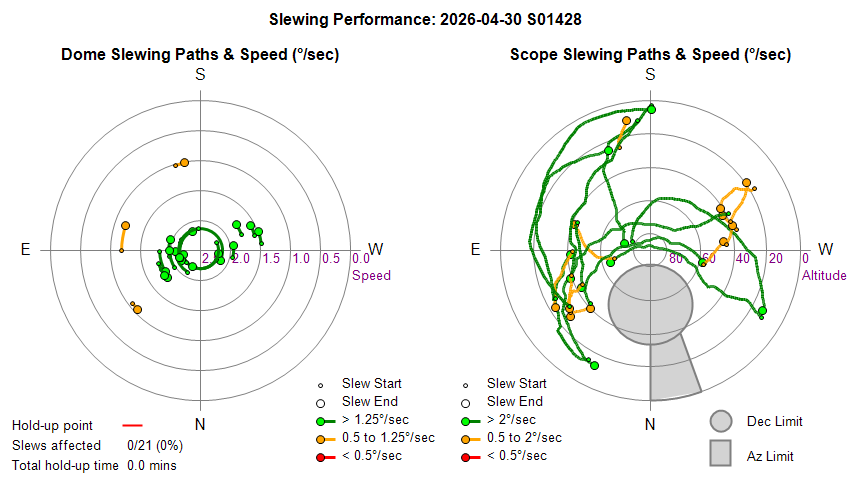
| Dome & Scope Slewing Performance | ||||||||||||||||||||||||||||||||||||||||||||||||||||||||||||||||||||||||||||||||||||||||||||||||||||||||||||||||||||||||||||||||||||||||||||||||||||||||||||||||||||||||||||||||||||||||||||||||||||||||||||||||||||||||||||||||||||||||||||||||||||||||||||||||||||||||||||||||||||||||||||||||||||||||||||||||||||||||||||||||||||||||||||||||||||||||||||||||||||||||||||||||||||||||||||||||||||||||||||||||||||||||||||||||||||||||||||||||||||||||||||||||||||||||||||
 |
||||||||||||||||||||||||||||||||||||||||||||||||||||||||||||||||||||||||||||||||||||||||||||||||||||||||||||||||||||||||||||||||||||||||||||||||||||||||||||||||||||||||||||||||||||||||||||||||||||||||||||||||||||||||||||||||||||||||||||||||||||||||||||||||||||||||||||||||||||||||||||||||||||||||||||||||||||||||||||||||||||||||||||||||||||||||||||||||||||||||||||||||||||||||||||||||||||||||||||||||||||||||||||||||||||||||||||||||||||||||||||||||||||||||||||
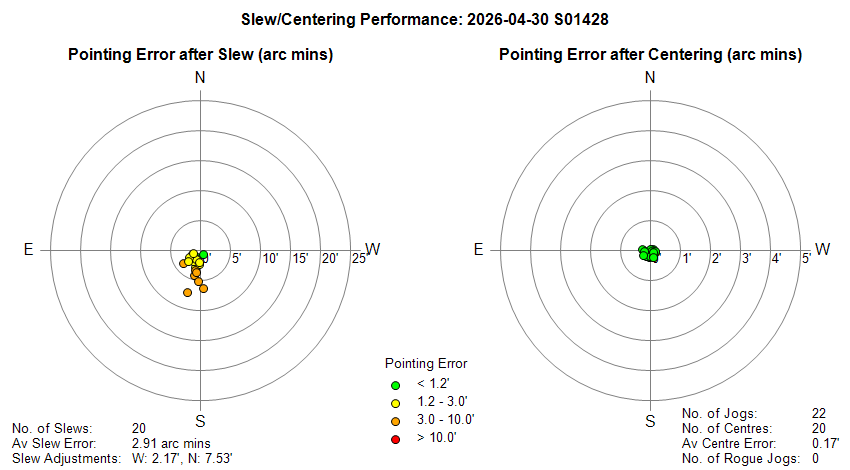
| Slew/Centering Performance | ||||||||||||||||||||||||||||||||||||||||||||||||||||||||||||||||||||||||||||||||||||||||||||||||||||||||||||||||||||||||||||||||||||||||||||||||||||||||||||||||||||||||||||||||||||||||||||||||||||||||||||||||||||||||||||||||||||||||||||||||||||||||||||||||||||||||||||||||||||||||||||||||||||||||||||||||||||||||||||||||||||||||||||||||||||||||||||||||||||||||||||||||||||||||||||||||||||||||||||||||||||||||||||||||||||||||||||||||||||||||||||||||||||||||||||
 |
||||||||||||||||||||||||||||||||||||||||||||||||||||||||||||||||||||||||||||||||||||||||||||||||||||||||||||||||||||||||||||||||||||||||||||||||||||||||||||||||||||||||||||||||||||||||||||||||||||||||||||||||||||||||||||||||||||||||||||||||||||||||||||||||||||||||||||||||||||||||||||||||||||||||||||||||||||||||||||||||||||||||||||||||||||||||||||||||||||||||||||||||||||||||||||||||||||||||||||||||||||||||||||||||||||||||||||||||||||||||||||||||||||||||||||
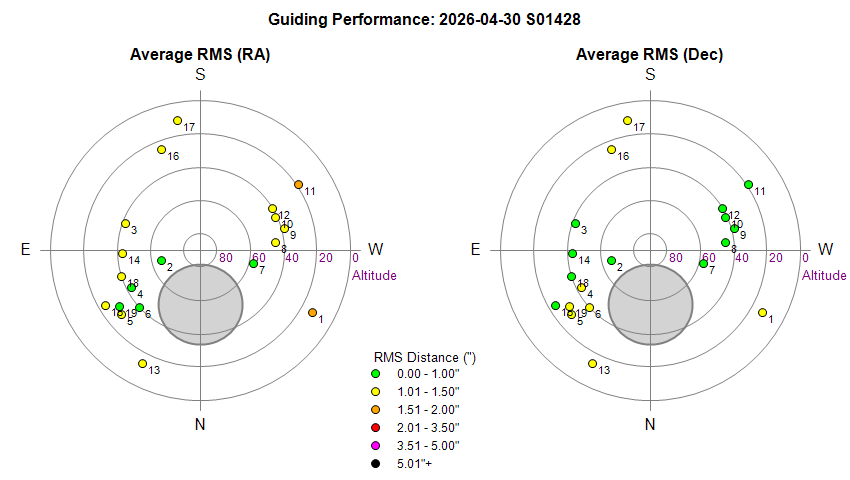
| Guiding Performance | ||||||||||||||||||||||||||||||||||||||||||||||||||||||||||||||||||||||||||||||||||||||||||||||||||||||||||||||||||||||||||||||||||||||||||||||||||||||||||||||||||||||||||||||||||||||||||||||||||||||||||||||||||||||||||||||||||||||||||||||||||||||||||||||||||||||||||||||||||||||||||||||||||||||||||||||||||||||||||||||||||||||||||||||||||||||||||||||||||||||||||||||||||||||||||||||||||||||||||||||||||||||||||||||||||||||||||||||||||||||||||||||||||||||||||||
 |
||||||||||||||||||||||||||||||||||||||||||||||||||||||||||||||||||||||||||||||||||||||||||||||||||||||||||||||||||||||||||||||||||||||||||||||||||||||||||||||||||||||||||||||||||||||||||||||||||||||||||||||||||||||||||||||||||||||||||||||||||||||||||||||||||||||||||||||||||||||||||||||||||||||||||||||||||||||||||||||||||||||||||||||||||||||||||||||||||||||||||||||||||||||||||||||||||||||||||||||||||||||||||||||||||||||||||||||||||||||||||||||||||||||||||||
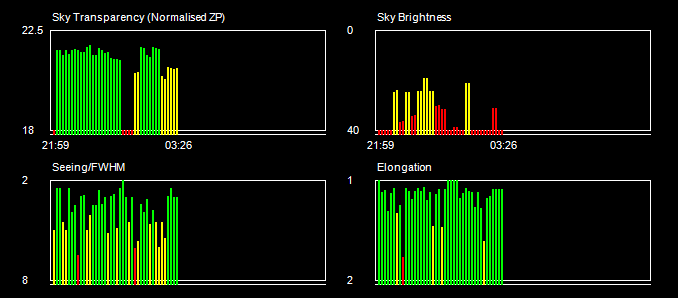
| Sky Conditions (Locate Frames) | ||||||||||||||||||||||||||||||||||||||||||||||||||||||||||||||||||||||||||||||||||||||||||||||||||||||||||||||||||||||||||||||||||||||||||||||||||||||||||||||||||||||||||||||||||||||||||||||||||||||||||||||||||||||||||||||||||||||||||||||||||||||||||||||||||||||||||||||||||||||||||||||||||||||||||||||||||||||||||||||||||||||||||||||||||||||||||||||||||||||||||||||||||||||||||||||||||||||||||||||||||||||||||||||||||||||||||||||||||||||||||||||||||||||||||||
 |
||||||||||||||||||||||||||||||||||||||||||||||||||||||||||||||||||||||||||||||||||||||||||||||||||||||||||||||||||||||||||||||||||||||||||||||||||||||||||||||||||||||||||||||||||||||||||||||||||||||||||||||||||||||||||||||||||||||||||||||||||||||||||||||||||||||||||||||||||||||||||||||||||||||||||||||||||||||||||||||||||||||||||||||||||||||||||||||||||||||||||||||||||||||||||||||||||||||||||||||||||||||||||||||||||||||||||||||||||||||||||||||||||||||||||||
|
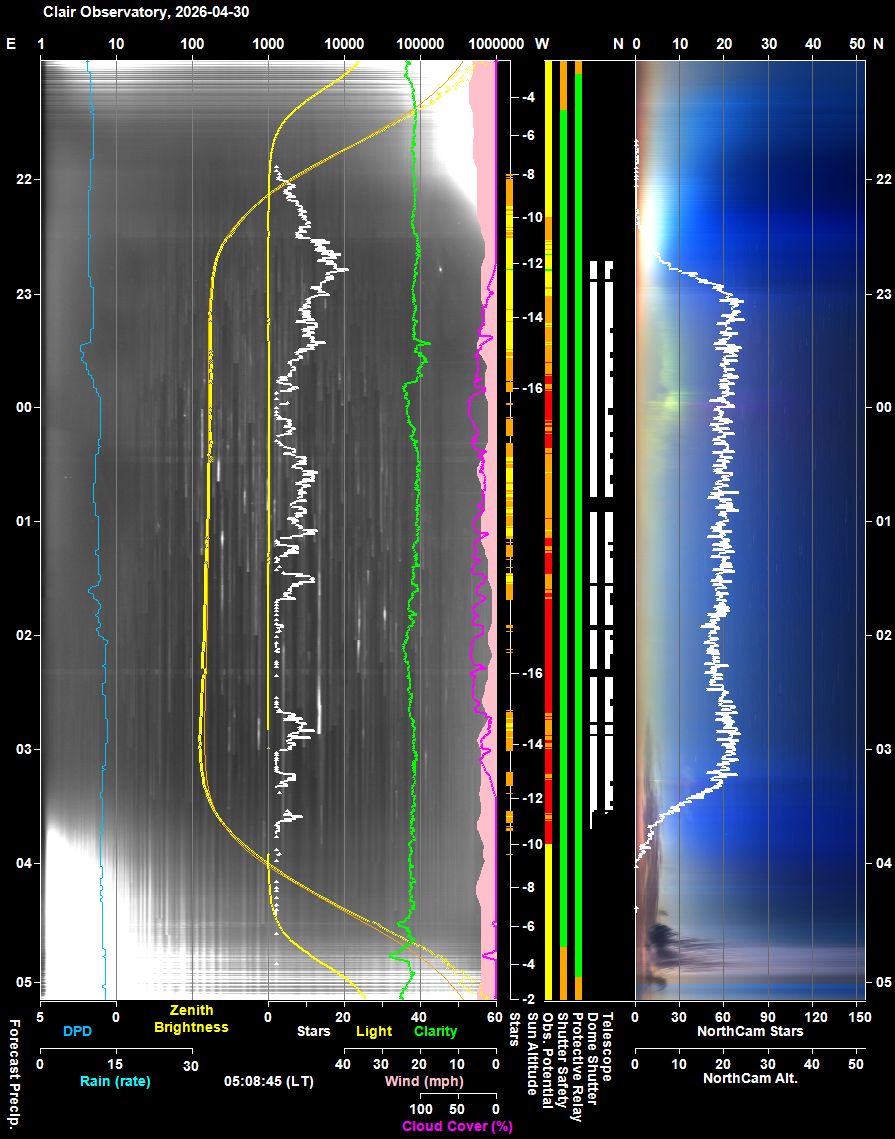
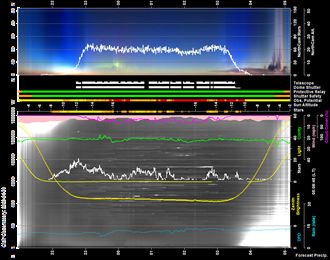
Night Sky Summary Plot Top axis: Sky Brightness at Zenith (in ADU/s) Lefthand axis: Local Time (hh LT). Righthand axis: Sun Altitude (degs) Note: The NorthCam Star Count line is unreliable and should be ignored (The AstroNorthCam 'Find' Star method is producing many false positives from clouds) |
||||||||||||||||||||||||||||||||||||||||||||||||||||||||||||||||||||||||||||||||||||||||||||||||||||||||||||||||||||||||||||||||||||||||||||||||||||||||||||||||||||||||||||||||||||||||||||||||||||||||||||||||||||||||||||||||||||||||||||||||||||||||||||||||||||||||||||||||||||||||||||||||||||||||||||||||||||||||||||||||||||||||||||||||||||||||||||||||||||||||||||||||||||||||||||||||||||||||||||||||||||||||||||||||||||||||||||||||||||||||||||||||||||||||||||
 |
||||||||||||||||||||||||||||||||||||||||||||||||||||||||||||||||||||||||||||||||||||||||||||||||||||||||||||||||||||||||||||||||||||||||||||||||||||||||||||||||||||||||||||||||||||||||||||||||||||||||||||||||||||||||||||||||||||||||||||||||||||||||||||||||||||||||||||||||||||||||||||||||||||||||||||||||||||||||||||||||||||||||||||||||||||||||||||||||||||||||||||||||||||||||||||||||||||||||||||||||||||||||||||||||||||||||||||||||||||||||||||||||||||||||||||
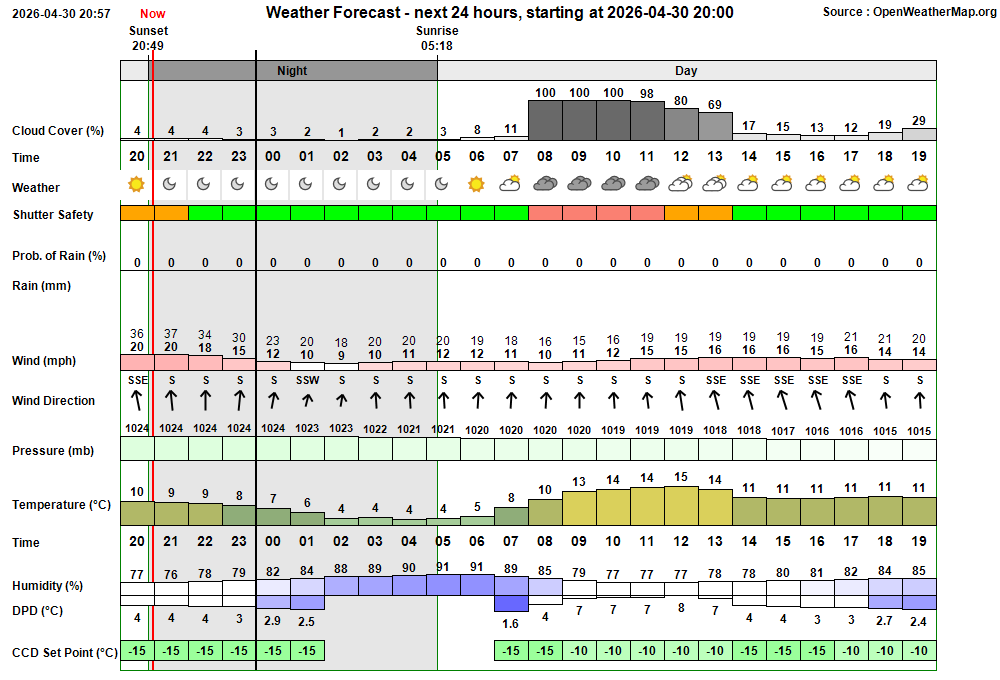
| Actual Weather vs Pre-Session Weather Forecast | ||||||||||||||||||||||||||||||||||||||||||||||||||||||||||||||||||||||||||||||||||||||||||||||||||||||||||||||||||||||||||||||||||||||||||||||||||||||||||||||||||||||||||||||||||||||||||||||||||||||||||||||||||||||||||||||||||||||||||||||||||||||||||||||||||||||||||||||||||||||||||||||||||||||||||||||||||||||||||||||||||||||||||||||||||||||||||||||||||||||||||||||||||||||||||||||||||||||||||||||||||||||||||||||||||||||||||||||||||||||||||||||||||||||||||||
 |
||||||||||||||||||||||||||||||||||||||||||||||||||||||||||||||||||||||||||||||||||||||||||||||||||||||||||||||||||||||||||||||||||||||||||||||||||||||||||||||||||||||||||||||||||||||||||||||||||||||||||||||||||||||||||||||||||||||||||||||||||||||||||||||||||||||||||||||||||||||||||||||||||||||||||||||||||||||||||||||||||||||||||||||||||||||||||||||||||||||||||||||||||||||||||||||||||||||||||||||||||||||||||||||||||||||||||||||||||||||||||||||||||||||||||||
 |
||||||||||||||||||||||||||||||||||||||||||||||||||||||||||||||||||||||||||||||||||||||||||||||||||||||||||||||||||||||||||||||||||||||||||||||||||||||||||||||||||||||||||||||||||||||||||||||||||||||||||||||||||||||||||||||||||||||||||||||||||||||||||||||||||||||||||||||||||||||||||||||||||||||||||||||||||||||||||||||||||||||||||||||||||||||||||||||||||||||||||||||||||||||||||||||||||||||||||||||||||||||||||||||||||||||||||||||||||||||||||||||||||||||||||||
| Session Event Log | ||||||||||||||||||||||||||||||||||||||||||||||||||||||||||||||||||||||||||||||||||||||||||||||||||||||||||||||||||||||||||||||||||||||||||||||||||||||||||||||||||||||||||||||||||||||||||||||||||||||||||||||||||||||||||||||||||||||||||||||||||||||||||||||||||||||||||||||||||||||||||||||||||||||||||||||||||||||||||||||||||||||||||||||||||||||||||||||||||||||||||||||||||||||||||||||||||||||||||||||||||||||||||||||||||||||||||||||||||||||||||||||||||||||||||||
|
||||||||||||||||||||||||||||||||||||||||||||||||||||||||||||||||||||||||||||||||||||||||||||||||||||||||||||||||||||||||||||||||||||||||||||||||||||||||||||||||||||||||||||||||||||||||||||||||||||||||||||||||||||||||||||||||||||||||||||||||||||||||||||||||||||||||||||||||||||||||||||||||||||||||||||||||||||||||||||||||||||||||||||||||||||||||||||||||||||||||||||||||||||||||||||||||||||||||||||||||||||||||||||||||||||||||||||||||||||||||||||||||||||||||||||
| Session Alerts & Alarms | ||||||||||||||||||||||||||||||||||||||||||||||||||||||||||||||||||||||||||||||||||||||||||||||||||||||||||||||||||||||||||||||||||||||||||||||||||||||||||||||||||||||||||||||||||||||||||||||||||||||||||||||||||||||||||||||||||||||||||||||||||||||||||||||||||||||||||||||||||||||||||||||||||||||||||||||||||||||||||||||||||||||||||||||||||||||||||||||||||||||||||||||||||||||||||||||||||||||||||||||||||||||||||||||||||||||||||||||||||||||||||||||||||||||||||||
|
||||||||||||||||||||||||||||||||||||||||||||||||||||||||||||||||||||||||||||||||||||||||||||||||||||||||||||||||||||||||||||||||||||||||||||||||||||||||||||||||||||||||||||||||||||||||||||||||||||||||||||||||||||||||||||||||||||||||||||||||||||||||||||||||||||||||||||||||||||||||||||||||||||||||||||||||||||||||||||||||||||||||||||||||||||||||||||||||||||||||||||||||||||||||||||||||||||||||||||||||||||||||||||||||||||||||||||||||||||||||||||||||||||||||||||
Back to Top
 On Hold 2026-05-07 (Observatory Computer,
Windows/User Accounts)
Fixed 2026-05-04 (Observatory
Computer)
Fixed 2026-05-07
(Observatory Computer, PHD2)
Fixed 2026-05-07
(Observatory, Zigbee Network, Pulsar Dome)
Fixed 2026-05-04 (Observatory Computer,
CCDSoft)
Fixed 2026-05-07 (Observatory Computer,
TeleAPI)
Fixed 2026-05-07
(Observatory Computer, PHD2)
Resolved 2026-05-14
(Observatory Computer, Eaton UPSCompanion)
Closed 2026-05-07
(Observatory, Eaton UPS, User Awareness)
Fixed 2026-05-14
(Pulsar Dome, AstroMain 3.82.1)
Done 2026-05-04
(AstroVma 0.3)
Done 2026-05-05
(AstroVma 0.3)
Done 2026-05-06
(AstroMain 3.81.12)
Done 2026-05-28
(AstroMain 3.82,6, Eaton UPS, DeviceManager)
On Hold 2026-05-07 (Observatory Computer,
Windows/User Accounts)
Fixed 2026-05-04 (Observatory
Computer)
Fixed 2026-05-07
(Observatory Computer, PHD2)
Fixed 2026-05-07
(Observatory, Zigbee Network, Pulsar Dome)
Fixed 2026-05-04 (Observatory Computer,
CCDSoft)
Fixed 2026-05-07 (Observatory Computer,
TeleAPI)
Fixed 2026-05-07
(Observatory Computer, PHD2)
Resolved 2026-05-14
(Observatory Computer, Eaton UPSCompanion)
Closed 2026-05-07
(Observatory, Eaton UPS, User Awareness)
Fixed 2026-05-14
(Pulsar Dome, AstroMain 3.82.1)
Done 2026-05-04
(AstroVma 0.3)
Done 2026-05-05
(AstroVma 0.3)
Done 2026-05-06
(AstroMain 3.81.12)
Done 2026-05-28
(AstroMain 3.82,6, Eaton UPS, DeviceManager) To do 2026-05-08+
(PemPro)
To do 2026-05-08+
(PemPro)Back to Top Issue, Back to Top
Fig 1. Screenshot
showing issue trying to create a new User Account on Observatory
Computer.
The Account Details form is blank preventing new
account details to be entered.
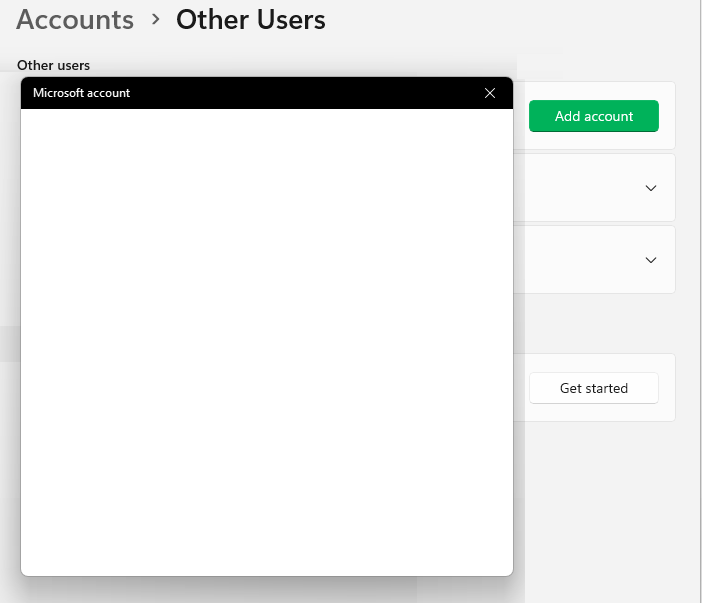
Fig 1b. Backdoor method to create
a new account
The backdoor workaround using 'netplwiz'
from Command prompt allows a new account to be defined, but a second
related issue prevents account setup from succeeding correctly after
logging into the new account.
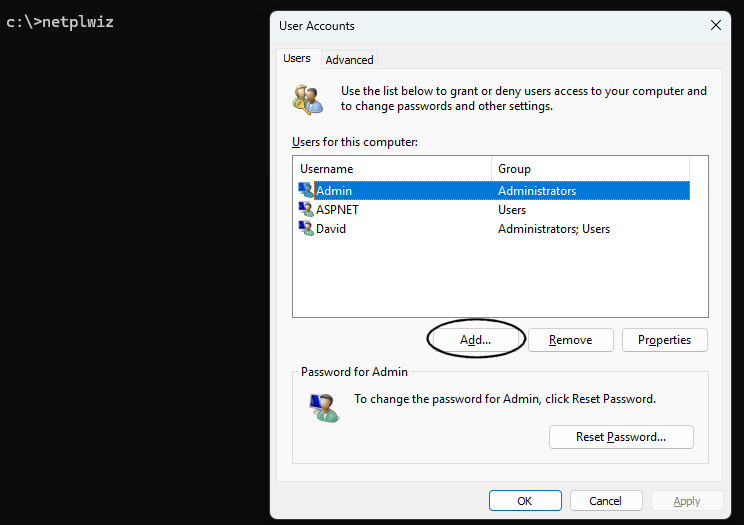
Fig 2. Example of
one of multiple CCDSoft System Error dialogs that appeared when
restarting CCDSoft at beginning of the S1411 session (19:38)
The backdoor workaround using 'netplwiz' allows a new account
to be defined, but a second related issue prevents account setup for
succeeding correctly after logging into the new account.
file:///C:/Data/Webs/richweb2/astro/images/Observatory.20260327.CCDSoft_SystemErrorDialog.png
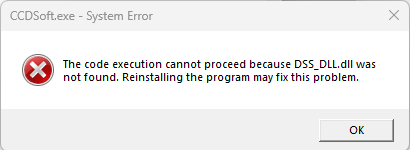
Fig 3. Eaton
UPSCompanion's Log file on 2026-05-07
After the USB cable to the UPS box is removed (as happened when
computer was removed from the Observatory over the last few days, the
last message in the log file is "Communication with UPS has failed".
There is no corresponding message to say the 'Communication with UPS has
restored'. Hence AstroMain program can only infer that the UPS is not
connected (and therefore its power state is unknown).
The
Euc.log files is shown below. The most recent alert/notification is
shown at top of list.

Back to Top Issue, Back to Top
Introduction
The current Observatory Computer (an ASUS ExpertBook P2451FA, i7-10510U, 8GB RAM, 512GB, 14 Inch, Windows) has been operating since Dec 2021,
Due to corruption in the Windows Operating system sometime around Mar 2026
and present by affecting the fall-back 'Admin' account (black screen after
login-in) and difficulties creating new user account, an in-place repair was
made on 2026-05-03 using the classical Window ISO/Mount/Setup.exe method.
Whilst this resolved the issue with the original Admin account, the issue
creating new accounts remained. Furthermore after the Windows in-place repair
the PHD2 Guiding software was found to immediately crash with an unhandled
exception (this occurred even after reinstalling the software). These issue pont
to a deeper level corruption / issue within the Windows system.
Since PHD2 is a critical software element within the Observatory's software
suite and it inability to run is a show-stopping issue. The only fix available
is to reinstall Windows and this will be undertaken in the next few days.
- The Window Reset / Reinstall will be performed using Keep Files option.
- All installed applications using the Program Files Area/Registry will be
lost and will have to be reinstalled after reinstalling Windows 11.
-
The whole process is expected to take 3-4 days of work
-
Any lessons from prior upgrades &
resinstallation will be incorporated into repair plan, including
.AllSky Computer - Full
Windows 11 Reinstalll (2025-10-28) (including all programs)
Applications
Windows
- Admin and User Account
- View
- Desktop
Picture, Desktop DPI, Icons Sizes
- Taskbar Toolbars: Astro, Comp, Apps
- Control Panel
- Device Manager
- Microsoft Edge, Google Search
Provider
Core Software
- Kaspersky Internet Security (Firewall
& AntiVirus)
- UltraVNC (for Remote Control)
-
Dimension 4 (for Time Sync)
- WinSCP (for ftp file upload to
website)
- ExplorerPatcher (windows GUI)
- Chrome (alternate web viewer)
General Software
- TextPad 9 (for File
Editing)
- ACDSee Classic (for Image Viewing)
- PaintShopPro 5
(for Screen Capture / Image editing)
- Visual Studio 2026
Observatory Software
- CCDSoft5
- TheSky6
-
deCONZ
- ASCOM 7 Platform / ASCOMPlatform713.4851)
- ASTAP (plat esolving)
- MeadeGeneric
Driver (Ascom Telescope driver for LX200)
- OptecTCF-Lynx Installer (Ascom Focuser driver)
- ffmpeg-win32-static
(video builder)
- ffmpeg-win64-static
(video builder)
- FV (5.3) (Fits Viewer)
- ImageMagicK (scripted
image manipulation & annotation)
-
Pegasus Unity (UPB Access)
- Pegasus Unity Ascom Drivers (Switch,
Focuser, Observing Conditions)
- PEMPro
- PHD2 (autoguiding)
-
Pulsar Dome software (Dome management)
- SAM III (magnetometer software)
- SiriL (Fits manipulation / ShCap Image Processing)
- SBIGDriverChecker64 (for SBIG
Camera)
- SharpCap 3.2 (image acquistion with ZWO camera)
-
TeleAPI (ASCOM interface from TheSky6 Telescope)
- Visual Studio
2026 (for debugging and exception diagnosis)
- ZWO Drivers
- AstroLaunch
- AstroPlan (targets / observing schedule)
- AstroMain (main
Observatory Console)
- AstroMag ( magnetometer)
- AstroGuard
-
AstroShCap
- AstroVOE
- AstroSN
Data and Applications
- Data in the C:/Data folder
are expected to be available following Windows Reinstall
- AstroSuite
programs in the 'C:/More Programs' folder are expected to be available
following the Windows Reinstall
-
New Settings
Once
new programs have been installed a number of program/data settings will have to
be input. These include:
UltraVNC
DeviceHub (dome & telescope)
Meade Generic (telescope)
PHD2
SharpCap (folder settings, Pro licence added, autoscript set to AstroShCap.py)
Pegasus UPB
PHD2 will need also need a
new calibration.
PemPro
AstroMain (need
COM Ports associated with LX200 Telescope, Pulsar Dome, TCF-S focuser & Pegasus
Powerbox)
TheSky6 : Server Settings (Allow remote connections,
Hide Server Window)
TheSky6 : Telescope Settings
CCDSoft5 : Source Extraction Setup
Initial Tests:
AstroMain access to
TheSky/CCDSoft objects
AstroMain image linking using CCDSoft & TheSky6
AstroMain access to TCP/IP datafeeds from
AllSky/Weather Computer
AstroPlan access to Targets Database
DeviceHub Working
(with Access to Sim Scope / Sim Dome, Control from AstroMain
Steps towards upgrading computer (to be conducted(
2026-05-05+
- Capture Settings (screenshots etc) for each
applications:
- Backup
of key files
Windows Reinstall (to be conducted)
Reinstall made on 2026-05-xx, taking some 3 hours..
- download started at xx (ended at
xx)
- installing began at xx:xx
- restart begun at xx:xx
- ready for
user login at xx:xx
After the upgrade two operations were conducted to set up the
computer ready for testing and use.
- Window Updates were downloaded
and installed
- ExplorerPatcher was installed
Application Re-Installs
- Installation of application was made on
New Settings
Once
new programs have been re-installed a number of program/data settings will have to
be input. These include:
UltraVNC
DeviceHub (dome & telescope)
Meade Generic (telescope)
PHD2
SharpCap (folder settings, Pro licence added, autoscript set to AstroShCap.py)
Pegasus UPB
PHD2 will need also need a
new calibration.
PemPro
AstroMain (need
COM Ports associated with LX200 Telescope, Pulsar Dome, TCF-S focuser & Pegasus
Powerbox)
TheSky6 : Server Settings (Allow remote connections,
Hide Server Window)
TheSky6 : Telescope Settings
CCDSoft5 : Source Extraction Setup
Initial Tests (to be conducted)
AstroMain access to
TheSky/CCDSoft objects
AstroMain image linking using CCDSoft & TheSky6
AstroMain access to TCP/IP datafeeds from
AllSky/Weather Computer
AstroPlan access to Targets Database
DeviceHub Working
(with Access to Sim Scope / Sim Dome, Control from AstroMain
Issues
Follow-Up :
Back to Top
| This Web Page | Notes - Session 1428 (2026-04-30) |
| Last Updated : | 2026-05-30 |
| Site Owner : | David Richards |
| Home Page : | David's Astronomy Web Site |
