David's Astronomy Pages
Notes - Session 1370 (2025-10-27)

Notes
(S1369)

Notes
Main
Home
Page

Notes
(S1371)
David's Astronomy Pages
|
Notes (S1369) |
Notes Main |
Home Page |
Notes (S1371) |
 |
Session Aims & Highlights |
| - Observing Result - Night Summary Plot - Session Event Log |
|
|
|
Operational Issues |
| - Critical Issues (0),
Major Issues (0),
Minor Issues (1),
Small Defects (0), Continuous Improvement
(0) |
|
| - Figures (1) | |
|
Images from 2025-10-27 >> |
| 2025-10-28 | |
|---|---|
|
|
AllSky/Weather Computer - Upgrade to Windows 11 |
Main aims
Equipment & Software
Highlights
 Targets.
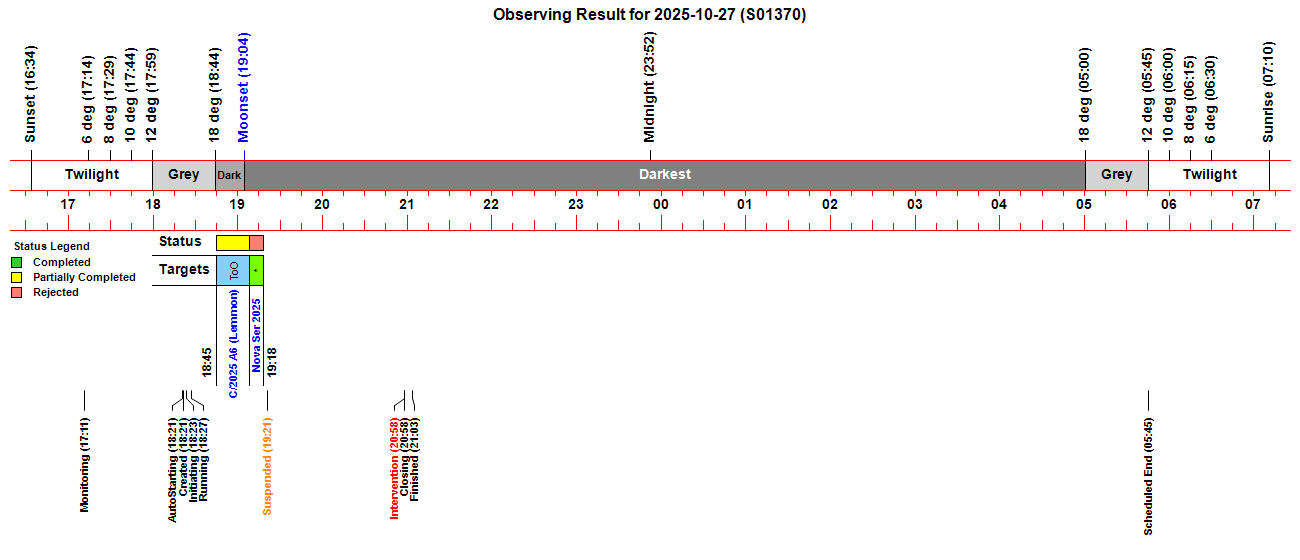
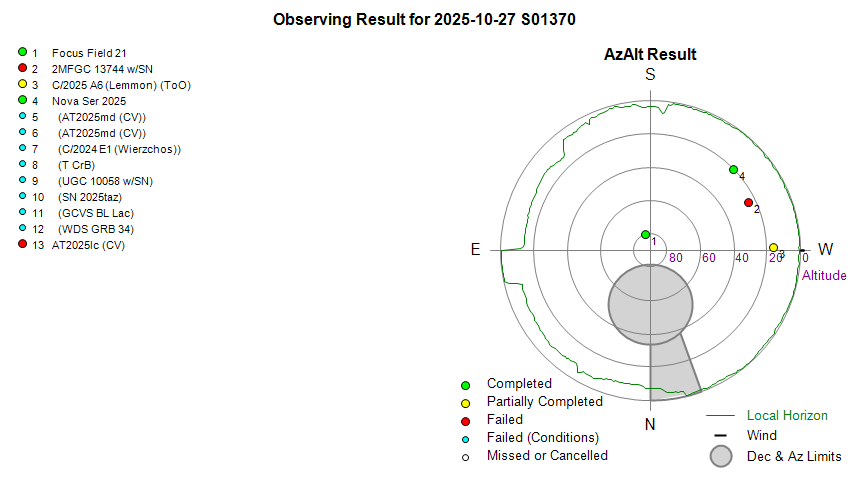
Only 1/39 planned targets were completed, but was later rejected
due to poor sky quality/cloud. Other planned targets failed due to
cloud/session suspension or cancelled due to earlier session finish because
of forecast cloud & rain. target (C/2025 A6 (Lemmon)) was
successfully acquired as a ToO target.
Targets.
Only 1/39 planned targets were completed, but was later rejected
due to poor sky quality/cloud. Other planned targets failed due to
cloud/session suspension or cancelled due to earlier session finish because
of forecast cloud & rain. target (C/2025 A6 (Lemmon)) was
successfully acquired as a ToO target.
 C/2025 A6 (Lemmon).
Images of comet comet C/2025 A6 (Lemmon) were
successfully collected.
CCD Camera.
No issues with CCD Camera during session. Dome.
There were no issues opening/closing the shutter during
the session, and the dome was successfully parked at the end of the session.
C/2025 A6 (Lemmon).
Images of comet comet C/2025 A6 (Lemmon) were
successfully collected.
CCD Camera.
No issues with CCD Camera during session. Dome.
There were no issues opening/closing the shutter during
the session, and the dome was successfully parked at the end of the session. Summary Plots & Logs
Observing Plan 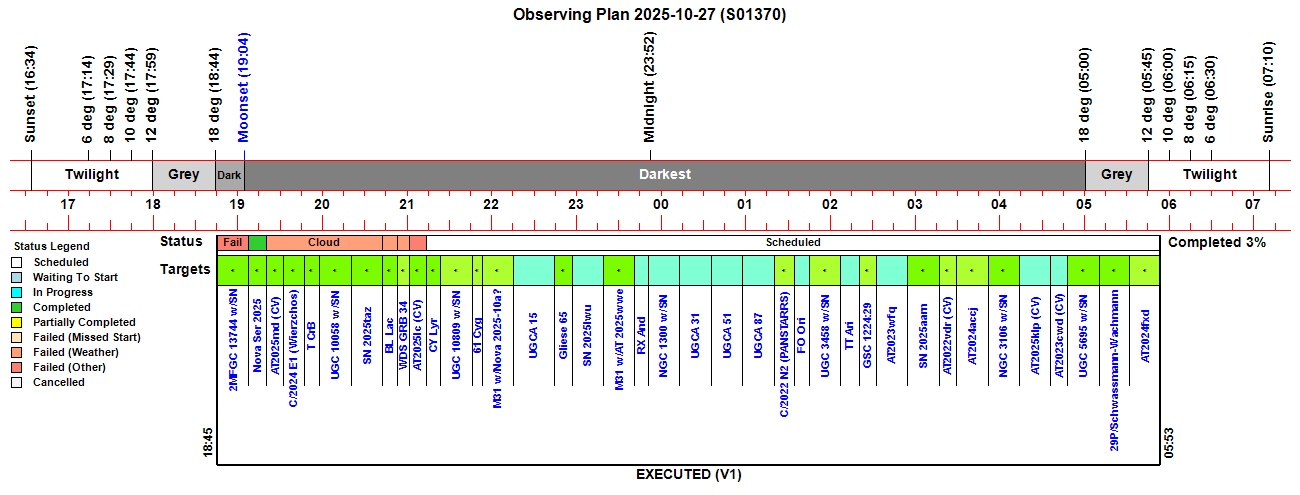 |
||||||||||||||||||||||||||||||||||||||||||||||||||||||||||||||||||||||||||||||||||||||||||||||||||||||||||||||||||||||||||||||||||||||||||||||||||||||||||||||||||||||||||||||||||||||||||||||||||||||||||||||||||||||||||||||||||||||||||||||||||||||||||||||||||||||||||||||||||||
|
Observing Result |
||||||||||||||||||||||||||||||||||||||||||||||||||||||||||||||||||||||||||||||||||||||||||||||||||||||||||||||||||||||||||||||||||||||||||||||||||||||||||||||||||||||||||||||||||||||||||||||||||||||||||||||||||||||||||||||||||||||||||||||||||||||||||||||||||||||||||||||||||||
 |
||||||||||||||||||||||||||||||||||||||||||||||||||||||||||||||||||||||||||||||||||||||||||||||||||||||||||||||||||||||||||||||||||||||||||||||||||||||||||||||||||||||||||||||||||||||||||||||||||||||||||||||||||||||||||||||||||||||||||||||||||||||||||||||||||||||||||||||||||||
 |
||||||||||||||||||||||||||||||||||||||||||||||||||||||||||||||||||||||||||||||||||||||||||||||||||||||||||||||||||||||||||||||||||||||||||||||||||||||||||||||||||||||||||||||||||||||||||||||||||||||||||||||||||||||||||||||||||||||||||||||||||||||||||||||||||||||||||||||||||||
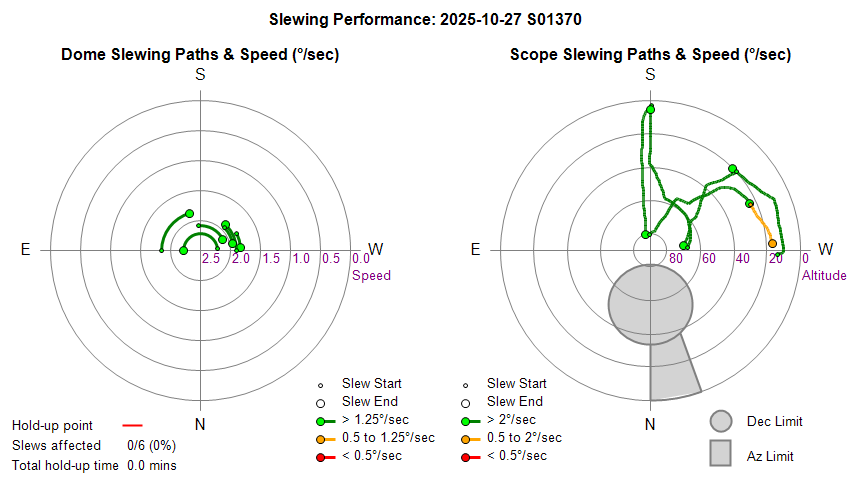
| Dome & Scope Slewing Performance | ||||||||||||||||||||||||||||||||||||||||||||||||||||||||||||||||||||||||||||||||||||||||||||||||||||||||||||||||||||||||||||||||||||||||||||||||||||||||||||||||||||||||||||||||||||||||||||||||||||||||||||||||||||||||||||||||||||||||||||||||||||||||||||||||||||||||||||||||||||
 |
||||||||||||||||||||||||||||||||||||||||||||||||||||||||||||||||||||||||||||||||||||||||||||||||||||||||||||||||||||||||||||||||||||||||||||||||||||||||||||||||||||||||||||||||||||||||||||||||||||||||||||||||||||||||||||||||||||||||||||||||||||||||||||||||||||||||||||||||||||
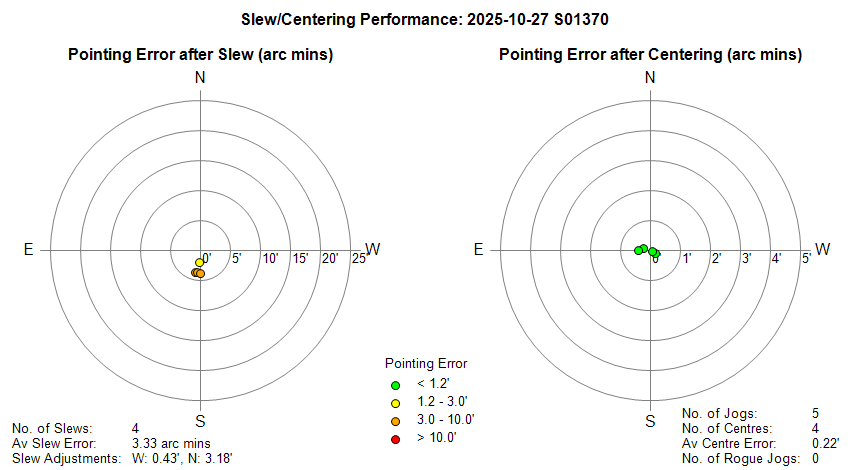
| Slew/Centering Performance | ||||||||||||||||||||||||||||||||||||||||||||||||||||||||||||||||||||||||||||||||||||||||||||||||||||||||||||||||||||||||||||||||||||||||||||||||||||||||||||||||||||||||||||||||||||||||||||||||||||||||||||||||||||||||||||||||||||||||||||||||||||||||||||||||||||||||||||||||||||
 |
||||||||||||||||||||||||||||||||||||||||||||||||||||||||||||||||||||||||||||||||||||||||||||||||||||||||||||||||||||||||||||||||||||||||||||||||||||||||||||||||||||||||||||||||||||||||||||||||||||||||||||||||||||||||||||||||||||||||||||||||||||||||||||||||||||||||||||||||||||
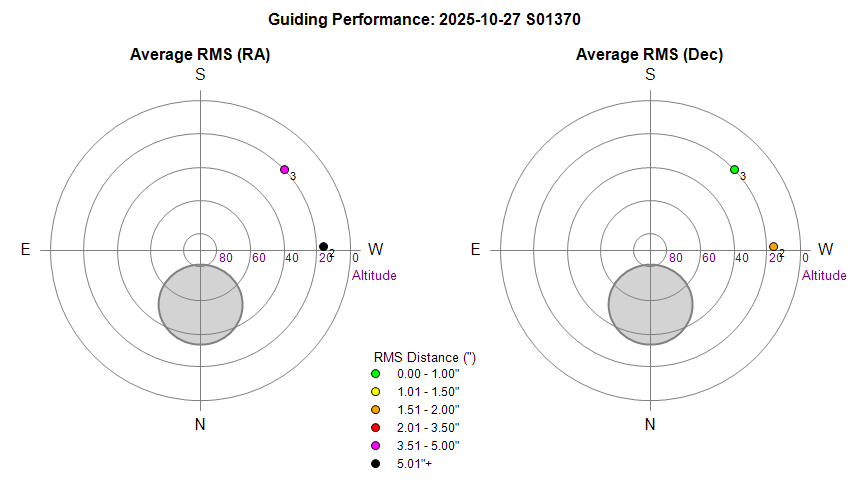
| Guiding Performance | ||||||||||||||||||||||||||||||||||||||||||||||||||||||||||||||||||||||||||||||||||||||||||||||||||||||||||||||||||||||||||||||||||||||||||||||||||||||||||||||||||||||||||||||||||||||||||||||||||||||||||||||||||||||||||||||||||||||||||||||||||||||||||||||||||||||||||||||||||||
 |
||||||||||||||||||||||||||||||||||||||||||||||||||||||||||||||||||||||||||||||||||||||||||||||||||||||||||||||||||||||||||||||||||||||||||||||||||||||||||||||||||||||||||||||||||||||||||||||||||||||||||||||||||||||||||||||||||||||||||||||||||||||||||||||||||||||||||||||||||||
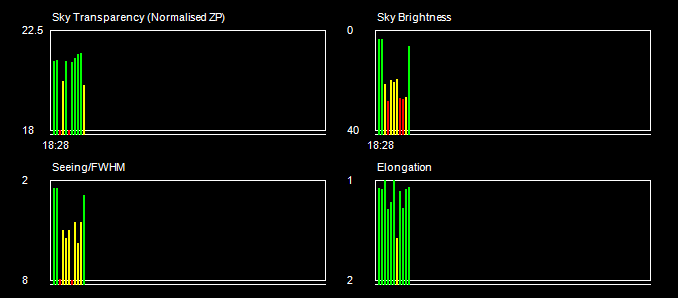
| Sky Conditions (Locate Frames) | ||||||||||||||||||||||||||||||||||||||||||||||||||||||||||||||||||||||||||||||||||||||||||||||||||||||||||||||||||||||||||||||||||||||||||||||||||||||||||||||||||||||||||||||||||||||||||||||||||||||||||||||||||||||||||||||||||||||||||||||||||||||||||||||||||||||||||||||||||||
 |
||||||||||||||||||||||||||||||||||||||||||||||||||||||||||||||||||||||||||||||||||||||||||||||||||||||||||||||||||||||||||||||||||||||||||||||||||||||||||||||||||||||||||||||||||||||||||||||||||||||||||||||||||||||||||||||||||||||||||||||||||||||||||||||||||||||||||||||||||||
|
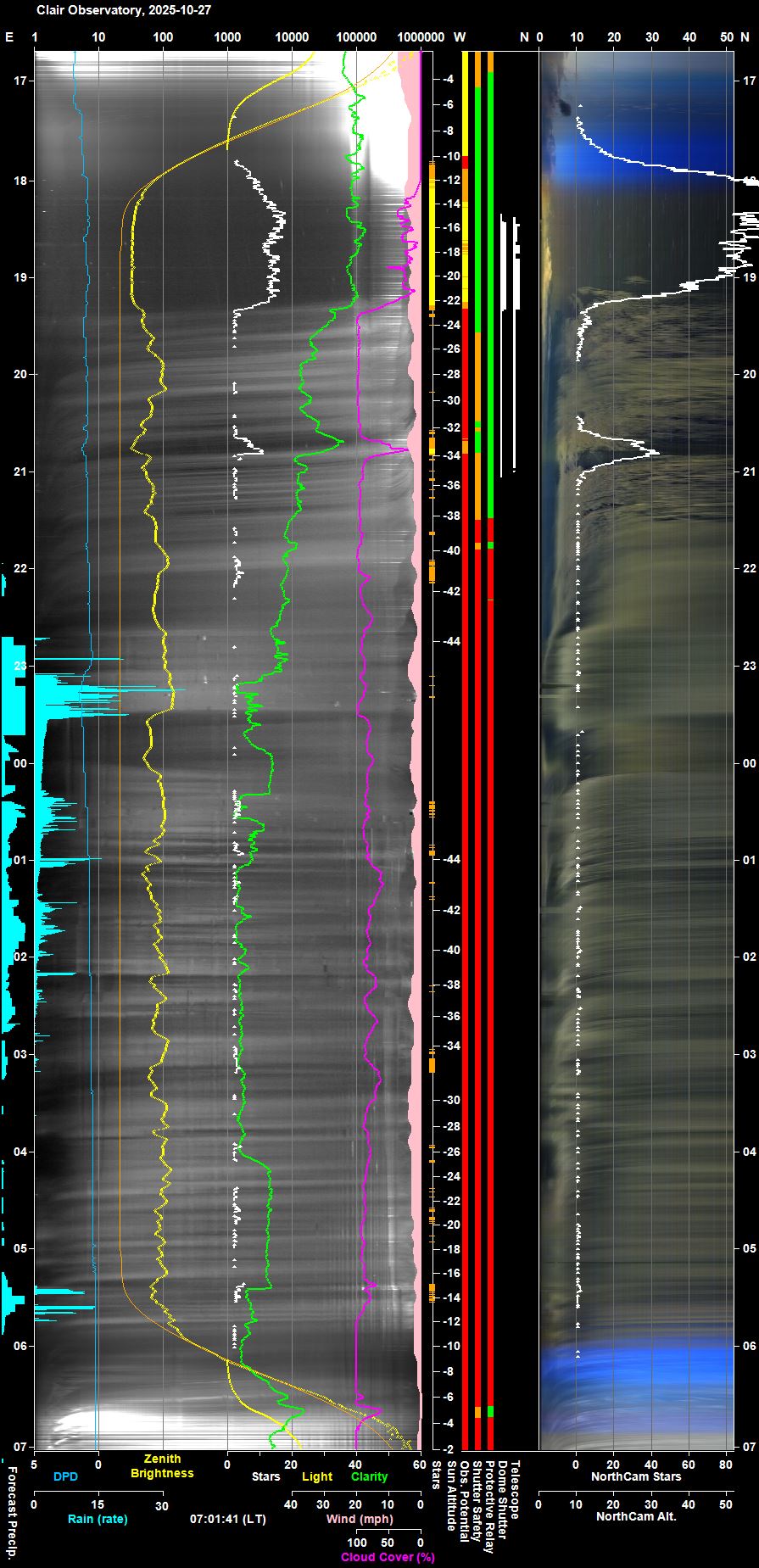
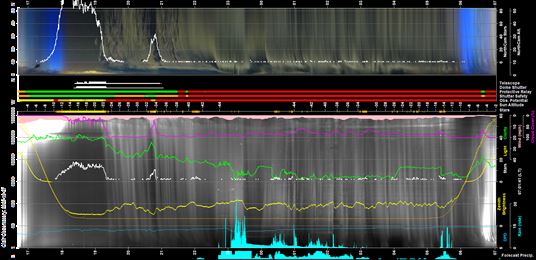
Night Sky Summary Plot Top axis: Sky Brightness at Zenith (in ADU/s) Lefthand axis: Local Time (hh LT). Righthand axis: Sun Altitude (degs) Note: The NorthCam Star Count line is unreliable and should be ignored (The AstroNorthCam 'Find' Star method is producing many false positives from clouds) |
||||||||||||||||||||||||||||||||||||||||||||||||||||||||||||||||||||||||||||||||||||||||||||||||||||||||||||||||||||||||||||||||||||||||||||||||||||||||||||||||||||||||||||||||||||||||||||||||||||||||||||||||||||||||||||||||||||||||||||||||||||||||||||||||||||||||||||||||||||
 |
||||||||||||||||||||||||||||||||||||||||||||||||||||||||||||||||||||||||||||||||||||||||||||||||||||||||||||||||||||||||||||||||||||||||||||||||||||||||||||||||||||||||||||||||||||||||||||||||||||||||||||||||||||||||||||||||||||||||||||||||||||||||||||||||||||||||||||||||||||
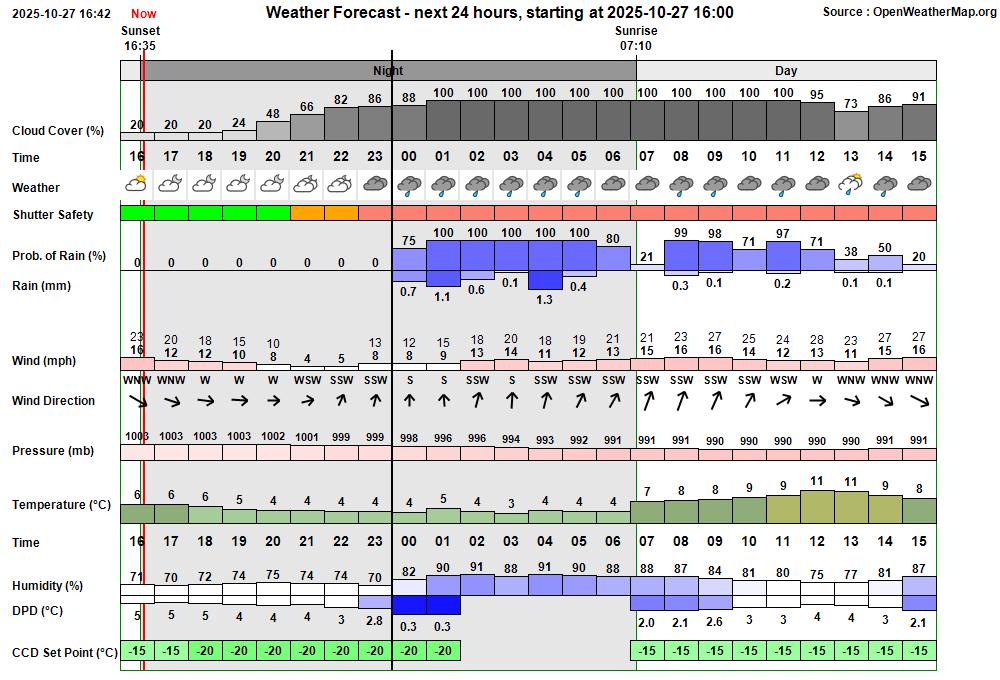
| Actual Weather vs Pre-Session Weather Forecast | ||||||||||||||||||||||||||||||||||||||||||||||||||||||||||||||||||||||||||||||||||||||||||||||||||||||||||||||||||||||||||||||||||||||||||||||||||||||||||||||||||||||||||||||||||||||||||||||||||||||||||||||||||||||||||||||||||||||||||||||||||||||||||||||||||||||||||||||||||||
 |
||||||||||||||||||||||||||||||||||||||||||||||||||||||||||||||||||||||||||||||||||||||||||||||||||||||||||||||||||||||||||||||||||||||||||||||||||||||||||||||||||||||||||||||||||||||||||||||||||||||||||||||||||||||||||||||||||||||||||||||||||||||||||||||||||||||||||||||||||||
 |
||||||||||||||||||||||||||||||||||||||||||||||||||||||||||||||||||||||||||||||||||||||||||||||||||||||||||||||||||||||||||||||||||||||||||||||||||||||||||||||||||||||||||||||||||||||||||||||||||||||||||||||||||||||||||||||||||||||||||||||||||||||||||||||||||||||||||||||||||||
| Session Event Log | ||||||||||||||||||||||||||||||||||||||||||||||||||||||||||||||||||||||||||||||||||||||||||||||||||||||||||||||||||||||||||||||||||||||||||||||||||||||||||||||||||||||||||||||||||||||||||||||||||||||||||||||||||||||||||||||||||||||||||||||||||||||||||||||||||||||||||||||||||||
|
||||||||||||||||||||||||||||||||||||||||||||||||||||||||||||||||||||||||||||||||||||||||||||||||||||||||||||||||||||||||||||||||||||||||||||||||||||||||||||||||||||||||||||||||||||||||||||||||||||||||||||||||||||||||||||||||||||||||||||||||||||||||||||||||||||||||||||||||||||
| Session Alerts & Alarms | ||||||||||||||||||||||||||||||||||||||||||||||||||||||||||||||||||||||||||||||||||||||||||||||||||||||||||||||||||||||||||||||||||||||||||||||||||||||||||||||||||||||||||||||||||||||||||||||||||||||||||||||||||||||||||||||||||||||||||||||||||||||||||||||||||||||||||||||||||||
|
||||||||||||||||||||||||||||||||||||||||||||||||||||||||||||||||||||||||||||||||||||||||||||||||||||||||||||||||||||||||||||||||||||||||||||||||||||||||||||||||||||||||||||||||||||||||||||||||||||||||||||||||||||||||||||||||||||||||||||||||||||||||||||||||||||||||||||||||||||
Back to Top
 Fixed 2025-10-29 (Greenhouse T/H sensor, Zigbee Network)
 Back to Top Issue, Back to Top
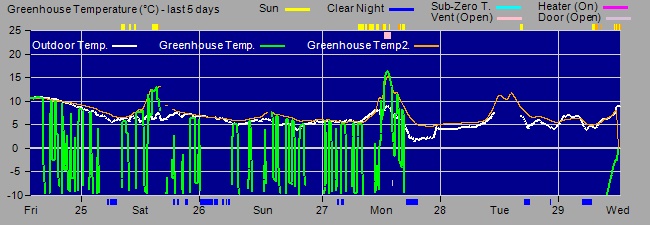
Fig 1. Greenhouse
Temperatures showing issue with Greenhouse1 Temperature (green line) even
before it finally stopped working at 2025-10-27 18:10
During
at least last 3 days the Greenhouse Temperature sensor 1 has intermittently
being giving values of -100. The zigbee network finally lost connection to
the sensor at 2025-10-27 18:11 when battery levels had fallen to 8% or less.
Back to Top Issue, Back to Top
Introduction
The AllSky/Weather Computer (a Toshiba Dynabook Satellite Pro C50-E-102, Windows 10) has been operating since 2025-10-23, when it was purchased and setup to replace an earlier computer that had failed (see Replacement AllSky Computer (2020-08-23) .
The computer is still running Windows 10 as of 2025-10-27, but this is no longer supported by Microsoft as of 2025-10-14. It is planned to upgrade the computer to Windows 11 to maintain security protection etc. A PC Health Check already confirms that the computer meets Windows 11 requirements.
The upgrade to Windows 11 will be performed using Windows Update, and as an
in-place upgrade:
- data files in C/Data folder and applications/data files
in C:/More Programs should be preserved.
- applications and windows settings
should be preserved provided that the "keep personal files and apps"
option is chosen during the in-place upgrade process.
(in the
event Windows Update automatically assumes that personal files and apps are to
be kept and the option to do otherwise is not given)
- as always it is recommended
to back up your data before starting the update/upgrade.
- programs,
settings and communications with Observatory Computer, Remote Computers
&Observatory Website will need thorough checking post-upgrade.
Windows 11 has been used on the current Development/Analysis Computer since Feb 2023 (see New Development Computer, 2023) where ExplorerPatcher is used to give a traditional styled task bar & start menu position and will need to be installed on the AllSky/Weather Computer after the Windows upgrade. AllSky/Weather Observatory Software has been confirmed to run ok on Development Computer (though not necessarily within live environment) .
The whole process should be done within a day if there are no issues, but if there are issues then 3-4 days of work may be needed to reinstall software & drivers, and perform more extensive testing. Any lessons will be passed onto upgrade of Observatory Computer to Windows 11.
Applications
Windows
- Admin and User Account
- View
- Desktop
Picture, Desktop DPI, Icons Sizes
- Taskbar Toolbars: Astro, Comp, Apps
- Control Panel
- Device Manager
- Microsoft Edge, Google Search
Provider.
Core Software
- Kaspersky Internet Security (Firewall
& AntiVirus)
- UltraVNC (for Remote Control)
-
Dimension 4 (for Time Sync)
- WinSCP (for ftp file upload to
website)
- ExplorerPatcher (windows GUI)
General Software
- TextPad 4 (for File
Editing)
- ACDSee Classic (for Image Viewing)
- PaintShopPro 5
(for Screen Capture / Image editing)
- Visual Studio 2022
Observatory Software
- CCDSoft5
- TheSky6
- Aurora Cloud Sensor III (3.2)
- CumulusMX
- iSpy64
- ASCOM 7.2
- MeadeGeneric Driver
- Starlight Xpress SXV Plug In.dll (to CCDSoft Version 5 /
Camera Plug-Ins)
- ffmpeg-win32-static
- ffmpeg-win64-static
- AstroLaunch
-
AstroAllSky
- AstroWeather
- AstroObsCam
- AstroNorthCam
-
Alternate Observatory Role Software
- AstroMain
- AstroPlan
- AstroShpCap
- FV (5.3)
- OptecTCF-Lynx Installer
- Pegasus Unity
- Pegasus Unity Ascom Drivers (Switch,
Focuser, Observing Conditions)
- PHD2 (autoguiding)
- SharpCap 3.2
Steps towards upgrading computer
2025-10-27 and 2025-10-28 (am)
- Capture Settings (screenshots etc)
- Backup
of key files
Upgrade
Upgrade from
Windows 10 to Windows 11 on the AllSky/Weather Computer was successfully made on 2025-10-28 with just a single
teething issue.
Issues
APOGEE32.dll, CFWAPI.dll, DSS_DLL.dll, ipl.dll Fixed
2025-10-28 (AllSky/Weather Computer, CCDSoft, Windows Upgrade)
Fixed
2025-10-28 (AllSky/Weather Computer, CCDSoft, Windows Upgrade)
Follow-Up 2025-11-01
Reviewing System.Information the WIndows 11 version that was installed on the
Observatory Computer on 2025-10-28 was 10.0.22631. Checking online showed that
this is Windows 11 23H2 (which was earlier second major update to Windows 11).
It is unclear why the Observatory Computer the following day was instead updated to the latest 10.0.26200 version instead, which is the Windows 11 25H2 version.
Since Windows Update is now offering update to Windows 11 25H2 it has been
decided to download and install the option, to keep up with the version used by
the Observatory Computer.
Update to Windows 11 25H2 (2025-11-01)
AllSky/Weather Computer was updated to 25H2 on 2025-11-01
Rather than shutdown all applications whilst waiting for the downloading and
pre-installing to occur, it was decided to keep AllSky/Weather/Observatory
services running and wait until Windows Update presented the 'Restart Computer'
now button, before closing the services down.
As anticipated the CCDSoft
dll's again went missing during the update, and had to be re-copied into the "C:\Program
Files (x86)\Common Files\System" folder from "C:\Data\Computer\Home
Computers\Missing CCDSoft DLLs (from Laptop7)" .
The Development Computer is also noted to
be on Window 11 23H2 (from time of its original purchase in Feb 2023) and likewise should be updated to Window 11 25H2 version
(see
Development/Analysis Computer - Windows 11 Update (25H2 Version) ).
Issues
Fixed in-session 2025-11-01 (CloudSensor III) Back to Top Issue, Back to Top
| This Web Page: | Notes - Session 1370 (2025-10-27) |
| Last Updated : | 2025-11-17 |
| Site Owner : | David Richards |
| Home Page : | David's Astronomy Web Site |